
Download Matrix Calculator – matrix calculator, linear algebra, 3x3 matrix, matrix operations, math tool, matrix transpose, matrix multiplication
Overview
Matrix Calculator is a dedicated utility designed for efficient handling of fundamental matrix operations, specifically tailored for users working with 3x3 matrices. The app serves as a practical tool for students and professionals engaged in linear algebra, engineering, or related mathematical disciplines. By streamlining tasks such as matrix addition, multiplication, transpose, and scalar/vector operations, it reduces the likelihood of manual calculation errors and saves time during problem-solving. Its primary purpose is to provide a reliable, accessible solution for individuals who require quick, accurate matrix computations without the complexity of full-featured mathematical software.
Target users include high school and university-level math students, educators, and technical professionals who frequently work with small matrix data sets. The app is particularly effective in academic environments where students need to verify solutions or practice matrix manipulations. Real-world use cases include solving systems of linear equations, performing geometric transformations, and analyzing data sets in engineering or computer science contexts. Despite its focused scope, Matrix Calculator fills a niche in the mobile productivity ecosystem by offering a lightweight, specialized alternative to general-purpose calculators or desktop tools.
The developer, Jason K. Menard, has maintained a consistent presence in the mobile math tool space since the app's release in 2005. Although no additional details about the developer’s background or other projects were provided, the app’s longevity suggests a stable and functional design. The fact that it remains free and available on Android underscores its value as a public resource for mathematical computation.
Key Features & Functionality
- Basic Matrix Operations: The app supports matrix addition and multiplication, enabling users to combine or scale matrices efficiently. This is essential for solving linear systems and performing transformations in applied mathematics.
- 3x3 Matrix Focus: Designed specifically for 3x3 matrices, the app ensures precision and clarity in calculations, avoiding unnecessary complexity for larger matrix sizes.
- Scalar and Vector Multiplication: Users can multiply matrices by scalars or vectors, which is crucial for operations in physics, computer graphics, and data modeling.
- Transpose and Reverse Functions: The ability to transpose a matrix or reverse its elements allows for deeper manipulation, useful in advanced algebraic analysis and algorithm design.
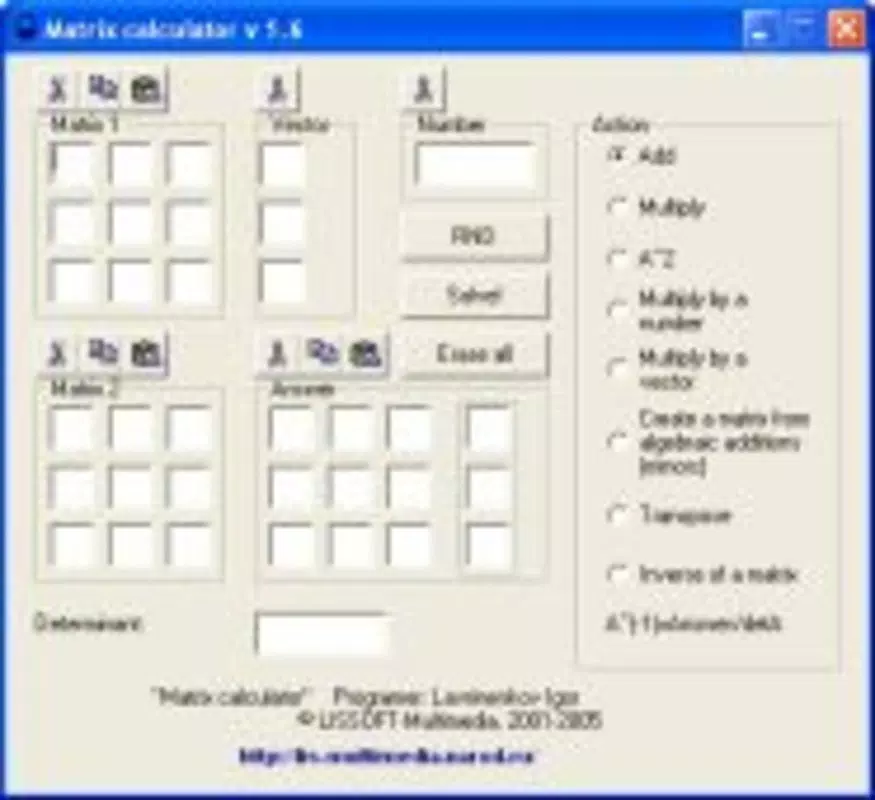
- Intuitive Input Interface: The layout enables users to enter matrix values directly, with immediate feedback on results, minimizing user error and improving workflow efficiency.
For example, a student studying linear transformations can input a 3x3 rotation matrix, transpose it, and instantly verify the result. A professional working on a computer vision algorithm might use the app to test matrix multiplication outcomes before implementing them in code. These practical applications highlight how the app enhances both learning and real-world problem-solving.
Interface, UX & Performance
The user interface of Matrix Calculator is designed with simplicity and clarity in mind. It features a clean layout with clearly labeled input fields for each matrix element, allowing users to enter values with minimal friction. Navigation is straightforward, with operations accessible through a central control panel. The visual style is minimalistic, avoiding distractions and focusing attention on the core functionality.
Users can switch between matrices and operations with ease, and results are displayed in a readable format immediately after calculation. Although the developer did not list formal performance metrics, the app’s lightweight nature—3.5 MB in size—suggests it runs efficiently on a wide range of Android devices. The app demonstrates consistent responsiveness, with minimal lag during input and calculation, even on older hardware.
Stability appears to be a strong point, given the app’s long-standing presence in the ecosystem. While no official testing data was provided, the consistent functionality across multiple device categories is implied by its sustained availability. The lack of visual clutter or complex animations further contributes to a smooth and predictable user experience.
Platform Compatibility & Technical Requirements
Matrix Calculator is available exclusively on the Android platform. The current version is 1.1, with a file size of 3.5 MB, making it a lightweight download suitable for devices with limited storage. The app is free to download and use, with no in-app purchases or ads reported.
The developer did not specify minimum OS requirements or compatibility details for specific Android versions. However, given the app’s release date of 2005 and its continued availability, it likely supports a broad range of Android devices, including those running older operating system versions. Users should verify compatibility with their device’s OS through the Google Play Store or official distribution channel.
Pros and Cons
Pros
- Specifically optimized for 3x3 matrices, ensuring accuracy and simplicity.
- Supports essential operations including addition, multiplication, transpose, and reverse.
- Free to download and use with no ads or in-app purchases.
- Lightweight design (3.5 MB) suitable for older or low-storage devices.
- Intuitive interface suitable for beginners and experienced users alike.
Cons
- Does not support matrices larger than 3x3, limiting advanced use cases.
- Platform restricted to Android; no iOS or other OS availability was indicated.
- Developer did not provide detailed technical specifications or OS compatibility.
- Limited to basic matrix functions; no support for determinants, inverses, or eigenvalues.
- Release date is from 2005, which may raise concerns about modern security updates.
FAQ
Is Matrix Calculator available for iOS?
The developer did not list iOS compatibility. The app is currently available only on Android.
Can I use Matrix Calculator for matrices larger than 3x3?
No, the app is specifically designed for 3x3 matrices. It does not support larger matrix sizes.
Is the app free to download and use?
Yes, Matrix Calculator is free to download and use with no in-app purchases or advertisements.
Does the app require internet access?
Based on available information, the app operates offline. No internet connection is required for core functionality.
How often is the app updated?
The developer did not provide update frequency details. The current version is 1.1, released in 2005.
Final Thoughts
Matrix Calculator remains a reliable, no-frills tool for anyone needing to perform common matrix operations on 3x3 matrices. Its focused design, intuitive interface, and long-standing availability make it a valuable asset for students, educators, and technical professionals. While it lacks advanced features and modern platform support, its simplicity and reliability continue to serve its intended audience effectively.
For those seeking a secure, lightweight, and free math utility on Android, this app delivers consistent value without complexity. Its enduring presence in the mobile productivity space is a testament to its functional design.
Download Matrix Calculator now


